Photo Eraser-Object Removal: AI quick retouching for social photos
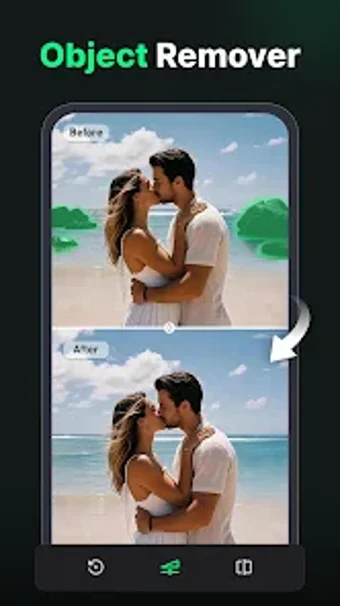
Photo Eraser-Object Removal from Shotcut Video Workshop is an Android app for removing unwanted elements from photographs using AI-powered tools. It offers one-tap object removal, a background eraser with replacement, and an AI Photo Upscaler to improve low-resolution images. The editor also provides portrait retouching, text and watermark removal, plus image adjustments and social-ready cropping. Social media creators and casual photographers gain a fast, on-device way to clean and enhance photos before sharing.

Unlock your creativity with Adobe Stock
Get 10 images or 1 video with a free trial
What is it used for?
The app transforms cluttered smartphone shots into cleaned images through AI-powered retouching. It removes strangers, power lines, and watermarks with one-tap automation, and serves as a single editor that also sharpens low-resolution files and refines portraits. This positions the app for the capture-to-post stage of a workflow, where social creators and casual photographers need rapid corrections before sharing work on feeds.
What output options and device compatibility does it offer?
The app produces transparent PNGs via its background eraser and includes social-ready cropping and resizing tuned for feed formats. It can replace backgrounds with AI-generated scenes and has an upscaler that converts low-res images toward higher clarity. Platform availability is Android, and specific performance characteristics depend on each device's hardware, which the developer notes varies across models.
Is the app approachable for casual creators?
Yes; the workflow uses guided selection tools and single-action commands so users can remove objects by brushing or lassoing a subject then tapping erase. The app requires no prior professional editing skills, and its portrait retouch suite offers targeted blemish and skin smoothing controls. This combination lets content-focused users finish a shareable image without moving to a desktop editor.
How reliable are edits and what behavioural concerns arise?
The AI Photo Upscaler and object removal are reported to produce natural-looking results, with users noting professional-quality edits and quick processing on typical devices. Although automation speeds common fixes, reliance on automatic removal can reduce precise manual control needed for complex composites. Removing watermarks or text is possible, which raises provenance and ethical considerations when altering identifiable or copyrighted material.
A practical recommendation for quick, on-device photo work
The app is a practical choice for creators who prioritize fast, on-device photo fixes before sharing, because it emphasizes a speed-first, automation-driven workflow. The trade-off is that automation reduces available granular controls for advanced compositing or precision retouching. It offers a practical bridge between capture and publication for everyday creators, while those requiring meticulous, frame-level editing should use desktop tools.